Create a Vesture Tutorial: Difference between revisions
Jump to navigation
Jump to search

No edit summary |
No edit summary |
||
| Line 1: | Line 1: | ||
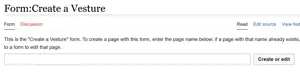
This tutorial will describe how to fill out the [[Form:Create_a_Vesture|'''Create a Vesture''']] form. | This tutorial will describe how to fill out the [[Form:Create_a_Vesture|'''Create a Vesture''']] form. | ||
# | #Copy the ''exact name from Victory Belles'' and paste it into the form. | ||
[[File:CreateVestureInterface.png|frameless|none|thumb]] | [[File:CreateVestureInterface.png|frameless|none|thumb]] | ||
#<li value=" | #<li value="2">If copying from another source such as an Excel sheet, it's likely special characters will paste without problems.</li> | ||
#If typing by hand, use [https://meta.wikimedia.org/wiki/Help:Special_characters#Important_special_characters| '''this MediaWiki help page'''] to address questions about entering special characters. | #If typing by hand, use [https://meta.wikimedia.org/wiki/Help:Special_characters#Important_special_characters| '''this MediaWiki help page'''] to address questions about entering special characters. | ||
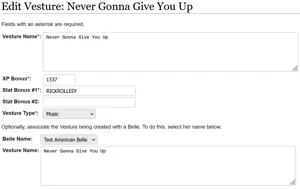
# The Vesture Name and Vesture Type are required | #If the Vesture already exists, an edit interface will appear, and no new addition is required (feel free to edit if something is in need of updating). | ||
[[File:Vesture_Exists.PNG|frameless|none|thumb]] | |||
#<li value="5">The Vesture Name and Vesture Type are required (they should auto-populate based on what was input into the Create form). The Vesture's Stat Bonus is optional. If the Belle associated with the Vesture is known, select her from the drop-down list next to Belle Name.</li> | |||
[[File:Create_a_Vesture_Form.PNG|frameless|none|thumb]] | [[File:Create_a_Vesture_Form.PNG|frameless|none|thumb]] | ||
#<li value="6">Save the page.</li> | #<li value="6">Save the page.</li> | ||
Revision as of 11:28, 8 April 2023
This tutorial will describe how to fill out the Create a Vesture form.
- Copy the exact name from Victory Belles and paste it into the form.

- If copying from another source such as an Excel sheet, it's likely special characters will paste without problems.
- If typing by hand, use this MediaWiki help page to address questions about entering special characters.
- If the Vesture already exists, an edit interface will appear, and no new addition is required (feel free to edit if something is in need of updating).

- The Vesture Name and Vesture Type are required (they should auto-populate based on what was input into the Create form). The Vesture's Stat Bonus is optional. If the Belle associated with the Vesture is known, select her from the drop-down list next to Belle Name.

- Save the page.