Create a Vesture Tutorial: Difference between revisions
Jump to navigation
Jump to search
(Created page with "#First, make sure the Vesture doesn't already exist by checking this {{#cargo_query: tables=ITEMVesture |fields=ITEMVesture.TXT_VestureName |format=csv |link text=Vesture names |filename=VestureNamesOnly }} list. #If it doesn't, then create it using its ''exact name from Victory Belles''. frameless|none|thumb #<li value="3">If copying from another source such as an Excel sheet, it's likely special characters will paste without proble...") |
No edit summary |
||
| Line 1: | Line 1: | ||
#First, make sure the Vesture doesn't already exist by checking this {{ | #First, make sure the Vesture doesn't already exist by checking this {{VestureCargoLink|LinkName=Vesture}} list. | ||
| | |||
}} list. | |||
#If it doesn't, then create it using its ''exact name from Victory Belles''. | #If it doesn't, then create it using its ''exact name from Victory Belles''. | ||
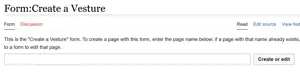
[[File:CreateVestureInterface.png|frameless|none|thumb]] | [[File:CreateVestureInterface.png|frameless|none|thumb]] | ||
Revision as of 23:32, 7 April 2023
- First, make sure the Vesture doesn't already exist by checking this Vesture list.
- If it doesn't, then create it using its exact name from Victory Belles.

- If copying from another source such as an Excel sheet, it's likely special characters will paste without problems.
- If typing by hand, use this MediaWiki help page to address questions about entering special characters.
- Save the page.