Create an Item Property Tutorial: Difference between revisions
Jump to navigation
Jump to search
No edit summary |
No edit summary |
||
| Line 1: | Line 1: | ||
This tutorial will describe how to fill out the [[Form:Advantage|'''Create an Advantage''']], [[Form:Quirk|'''Create a Quirk''']], and [[Form:Gremlin|'''Create a Gremlin''']] forms. They are all mechanically similar, but stored in different databases hence the separate forms. | This tutorial will describe how to fill out the [[Form:Advantage|'''Create an Advantage''']], [[Form:Quirk|'''Create a Quirk''']], and [[Form:Gremlin|'''Create a Gremlin''']] forms. They are all mechanically similar, but stored in different databases hence the separate forms. | ||
#{{ExactWords|item}} This also prevents duplication because the form will not allow a second entry for the exact same wording. | |||
#{{ExactWords|item}} | |||
#Fill it in like this. The first property is mandatory because all item properties have at least one impact, but only some have up to six (not shown in image below). Note that ''this'' page does not distinguish between red/green game text, that will be handled on another page. '''Ensure that a = is included between the name and its impact so that future displays will work properly (splitting on the =).''' | #Fill it in like this. The first property is mandatory because all item properties have at least one impact, but only some have up to six (not shown in image below). Note that ''this'' page does not distinguish between red/green game text, that will be handled on another page. '''Ensure that a = is included between the name and its impact so that future displays will work properly (splitting on the =).''' | ||
[[File:QuirkFillInExample.png|frameless|none|thumb]][[File:VictoryBellesQuirkExample.png|frameless|none|thumb]] | [[File:QuirkFillInExample.png|frameless|none|thumb]][[File:VictoryBellesQuirkExample.png|frameless|none|thumb]] | ||
#<li value=" | #<li value="3">Save the page.</li> | ||
Revision as of 09:42, 12 April 2023
This tutorial will describe how to fill out the Create an Advantage, Create a Quirk, and Create a Gremlin forms. They are all mechanically similar, but stored in different databases hence the separate forms.
- Please ensure information for item is copied verbatim from Victory Belles. For words, this includes capitalization, accented marks, spelling errors, and strange grammar. For numbers, this includes decimals (please do not round). This also prevents duplication because the form will not allow a second entry for the exact same wording.
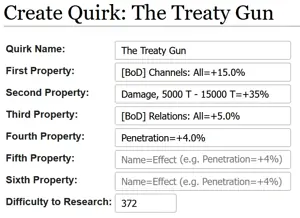
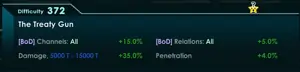
- Fill it in like this. The first property is mandatory because all item properties have at least one impact, but only some have up to six (not shown in image below). Note that this page does not distinguish between red/green game text, that will be handled on another page. Ensure that a = is included between the name and its impact so that future displays will work properly (splitting on the =).


- Save the page.