Create an Item Property Tutorial: Difference between revisions
Jump to navigation
Jump to search
m (WikiAdmin moved page Create an Item Property Tutorial to Create an Item Property Tutorial: The procedure for advantages, quirks, and gremlins is mechanically the same.) |
No edit summary |
||
| Line 1: | Line 1: | ||
#First, make sure the Quirk or | In terms of how this wiki is set up, Advantages, Quirks, and Gremlins have their data entered in the same way. They are, however, distinct item types within the wiki. | ||
#First, make sure the Advantage, Quirk, or Gremlin doesn't already exist by checking the relevant {{#cargo_query: | |||
tables=ITEMAdvantage | |||
|fields=ITEMAdvantage.TXT_AdvantageName | |||
|format=csv | |||
|link text=Advantage list | |||
}}, {{#cargo_query: | |||
tables=ITEMQuirk | tables=ITEMQuirk | ||
|fields=ITEMQuirk.TXT_QuirkName | |fields=ITEMQuirk.TXT_QuirkName | ||
|format=csv | |format=csv | ||
|link text=Quirk list | |link text=Quirk list | ||
}} or {{#cargo_query: | }}, or {{#cargo_query: | ||
tables= | tables=ITEMGremlin | ||
|fields= | |fields=ITEMGremlin.TXT_GremlinName | ||
|format=csv | |format=csv | ||
|link text= | |link text=Gremlin list | ||
}}. | }}. | ||
#Use the name directly from the game. | #Use the name directly from the game. | ||
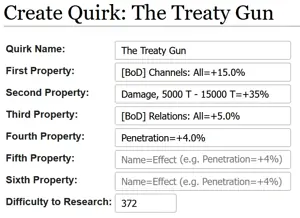
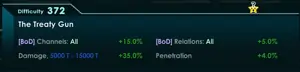
#Fill it in like this. The first property is mandatory because all | #Fill it in like this. The first property is mandatory because all item properties have at least one impact, but only some have up to six (not shown in image below). Note that ''this'' page does not distinguish between red/green game text, that will be handled on another page. '''Ensure that a = is included between the name and its impact so that future displays will work properly (splitting on the =).''' | ||
[[File:QuirkFillInExample.png|frameless|none|thumb]][[File:VictoryBellesQuirkExample.png|frameless|none|thumb]] | [[File:QuirkFillInExample.png|frameless|none|thumb]][[File:VictoryBellesQuirkExample.png|frameless|none|thumb]] | ||
#<li value="4">Save the page.</li> | #<li value="4">Save the page.</li> | ||
Revision as of 22:43, 7 April 2023
In terms of how this wiki is set up, Advantages, Quirks, and Gremlins have their data entered in the same way. They are, however, distinct item types within the wiki.
- First, make sure the Advantage, Quirk, or Gremlin doesn't already exist by checking the relevant Error: Table ITEMAdvantage not found.,Error: Table ITEMQuirk not found., orError: Table ITEMGremlin not found..
- Use the name directly from the game.
- Fill it in like this. The first property is mandatory because all item properties have at least one impact, but only some have up to six (not shown in image below). Note that this page does not distinguish between red/green game text, that will be handled on another page. Ensure that a = is included between the name and its impact so that future displays will work properly (splitting on the =).


- Save the page.